

A purchase order is a formal, numbered document a buyer sends a supplier to authorize a purchase, spelling out the items, quantities, agreed price, and delivery terms. Say an e-commerce brand needs 200 units of a bestselling SKU from a supplier. The purchase order is the paperwork that turns "we should reorder" into a binding order the supplier can fulfill and invoice against.
Definition and Overview of Purchase Orders
The purchase order meaning is straightforward: it's the buyer's official request to buy, sent before any goods change hands. That timing is what separates it from the other documents in the chain. A quote is the supplier telling you what something would cost. An invoice is the supplier billing you after they ship. The purchase order, or PO, sits in the middle and comes from you, the buyer.

In the 200-unit example, your PO names the SKU, the quantity, the unit price you agreed on, and the date you expect delivery. Once the supplier accepts it, both sides have a record of exactly what was ordered and on what terms. A purchase order also carries a unique number, which becomes the reference every later document points back to: the acknowledgment, the goods receipt, and the invoice all cite it. That shared reference is what makes the paperwork auditable later.
That record is the whole reason growing operations stop ordering by text message and start using real POs. Order by text and there is no line-item record, no agreed price on file, and nothing to check the invoice against. A purchase order gives every order a fixed, referenceable form.
Purchase Order Formats: Electronic and Non-electronic
Purchase orders come in two broad formats, and the one you use shapes how fast the order moves and how many hands retype it.
Non-electronic POs. These are paper or PDF documents, often built from a template and sent by mail, fax, or email attachment. They work, and for a low-volume buyer they are perfectly fine. The cost is manual handling: someone types the PO, someone at the supplier keys it into their system, and the numbers get retyped again at receiving and invoicing. Every retype is a place for a figure to drift.
Electronic POs. These live inside a purchasing or inventory system and move as structured data, not a flat page. An electronic PO can be generated from a reorder-point alert, sent to the supplier, and matched against the receipt and invoice without anyone rekeying a quantity. Larger supplier relationships sometimes run on EDI (electronic data interchange), a standard format that lets two systems exchange orders directly. For most e-commerce and light-manufacturing teams, an electronic PO inside their inventory platform delivers the same benefit: one record that every stage reads from.
The format matters because it decides whether your PO is a static file or a live record. A PDF sits still. An electronic PO participates in the loop described later in this guide.
PO vs. Invoice: How They Fit Together
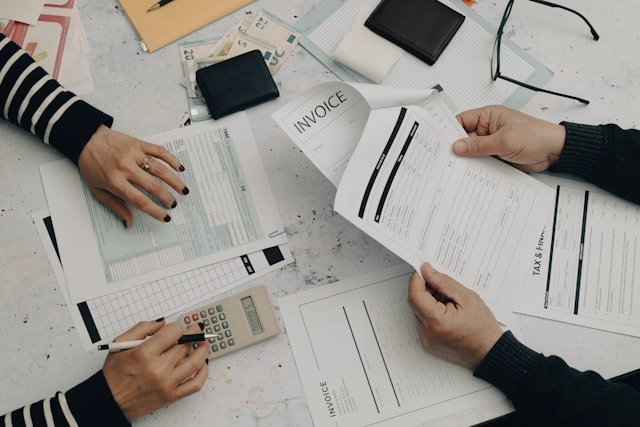
The PO vs. invoice question trips people up because both documents describe the same order, just from opposite directions and at different times.
In a typical flow, the documents appear in this order:
Purchase order goes from you (buyer) to the supplier, authorizing the purchase.
Supplier acknowledgment confirms they accept the order and its terms.
Goods receipt note is created when the shipment arrives and you count what came in.
Invoice goes from the supplier to you, requesting payment for what they shipped.
Each one plays a distinct role. The PO is the commitment. The invoice is the bill. The goods receipt note is your proof of what physically showed up.
How a PO gets paid
A PO gets paid through a control called the three-way match. Before you release payment, you compare three numbers: the quantity you ordered on the PO, the quantity you actually received, and the quantity the supplier billed on the invoice. When all three agree, you pay with confidence. When they don't, you've caught a problem before money left your account.
That check is the main reason a growing operation formalizes purchase orders in the first place. Suppose your PO says 200 units, receiving counts 180, and the invoice bills for 200. Without the three-way match, you overpay for 20 units you never got. With it, the discrepancy surfaces the moment the invoice arrives, and you either withhold payment or get a corrected bill. For an e-commerce or light-manufacturing team buying components across several suppliers a month, that control is the difference between clean books and slow leaks.

Direct and Indirect Procurement
Purchase orders cover two kinds of buying, and separating them keeps your reporting honest.
Direct procurement is the buying that goes into what you sell: finished goods for resale, or the components and raw materials that get assembled into your products. A PO for 200 units of a bestselling SKU is direct procurement. So is a PO for the bottles, pumps, and boxes that build a kit. These purchases scale with your sales, and they are the ones your reorder points and forecasts drive.
Indirect procurement is everything you buy to run the operation but never resell: packaging supplies, warehouse equipment, software, shipping materials, and office goods. It doesn't flow through a bill of materials and it doesn't move with unit sales the same way.
The distinction matters for how you plan. Direct spend is tied to demand, so it belongs in the reorder-point and forecast loop. Indirect spend is more periodic and often runs on blanket agreements or scheduled buys. Tracking the two separately lets you see true cost of goods on the direct side without indirect purchases muddying the number.
The 4 Types of Purchase Orders Explained
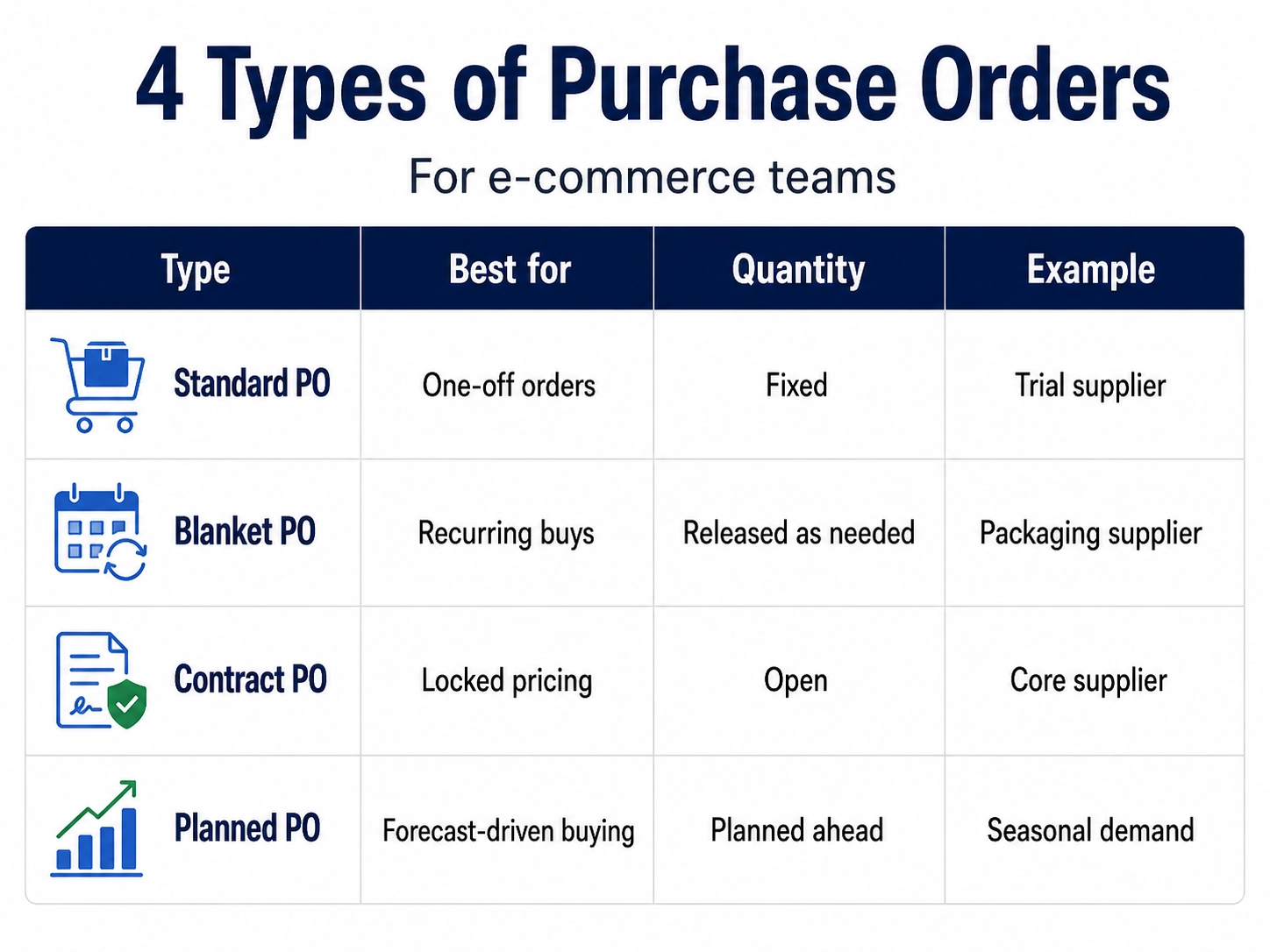
There are four common types of purchase orders, and each one fits a different buying situation. Knowing which to use keeps your paperwork honest and your supplier relationships clear.
Standard PO. A one-off order with a fixed quantity and price. This is what you send when you're trialing a new supplier or buying something you don't order on a schedule. In the 200-unit example, if that supplier is new to you, a standard PO is the right call.
Blanket PO. An agreement to buy over a period at agreed terms, with individual releases drawn down as you need them. If you've got a reliable component supplier you buy from every few weeks, a blanket PO locks your pricing and cuts the admin of writing a fresh order each time. You just release against the existing agreement.
Contract PO. A framework agreement where pricing is locked but quantities stay open. It works like a blanket PO for terms, without committing you to a total volume up front. Useful for a top-supplier relationship where you know the price you'll pay but not exactly how much you'll need.
Planned PO. A purchase order generated from a demand forecast or a material requirements planning (MRP) run, dated in advance. In a manufacturing context, a planned PO is the output of the system working backward from what you expect to sell or build. A seasonal product line is the classic case: you plan the component buys months ahead so the goods land before demand does.
The Purchase Order as an Operational Loop, Not a Document
Most guides define a PO and stop at the document. That misses the point. For an e-commerce or light-manufacturing team, a purchase order is only useful when it's part of a live loop that refills your shelves and keeps your channel counts honest.
The loop starts when a SKU hits its reorder point and the system alerts you. That alert should flow straight into a draft purchase order instead of a sticky note. From there the cycle runs through five stages:
The reorder-point alert fires on a low-stock SKU.
A draft PO is created from that alert, pre-filled with the supplier and a suggested quantity.
The PO is sent and the supplier acknowledges it.
Goods arrive, get received, and are put away.
Inventory counts update and the loop closes.
Manual systems break the loop at every seam. The alert lives in one place, the PO in an email thread, the receiving count on a clipboard, and the stock number in Shopify. Every handoff is a chance for a number to drift. When the whole cycle runs in one system, the reorder-point alert becomes a draft PO with no copy-paste, and the received quantity updates on-hand stock without anyone retyping it. That's the difference between purchase order management as a filing habit and purchase order management as an engine.

How Reorder Points Trigger Purchase Orders (And Why Timing Matters)
A reorder point is the stock level at which you fire a purchase order so a fresh shipment arrives before you run out. The reorder point purchase order connection is the whole mechanic of proactive restocking.
In plain terms, a reorder point adds up how much you expect to sell during the wait for a new shipment, then puts a buffer on top of that. The demand-over-lead-time part tells you how much you'll sell while the order is in transit. The buffer, or safety stock, is sized to your supplier's lead-time variability. The longer and less reliable that lead time, the bigger the buffer you need. Our safety stock formula guide walks through six ways to calculate it and when each one fits.
The timing rule is simple: the PO must go out before you dip into safety stock, not after. Safety stock exists to cover the gap when a shipment runs late or demand spikes. If you only reorder once you've already eaten into it, you've spent your cushion before the emergency. Ordering reactively, after you've already run low, is the mistake that turns a minor supplier delay into a stockout.
This is where automation earns its keep. Organizely fires reorder-point alerts without anyone watching a dashboard, then converts them into draft POs. The ecommerce inventory management guide breaks down the reorder-point-to-PO workflow in more detail if you want the full replenishment picture.
How a Purchase Order in Transit Affects Available-to-Promise Stock
A purchase order in transit, with a known ETA, is stock you can promise to a customer. That single idea changes how you sell during a restock window.
Available-to-promise (ATP) is your true sellable quantity. It starts from what you have on hand, adds inbound stock you can count on (a confirmed PO with a known delivery date), and subtracts the orders you've already committed to fulfill. The result is the number you can honestly sell against today.
On-hand alone undersells you. If you've got 20 units on the shelf but a PO for 200 arriving Friday, you can promise against far more than 20 today, as long as delivery dates are honest. The available-to-promise purchase order link is what lets you keep selling through a low-stock moment instead of hiding a product until the pallet lands.
The flip side is what breaks without it. If your on-hand count is the only number your channels see, you either stop selling too early and lose orders, or you keep selling with no inbound visibility and oversell. Overselling means cancelled orders, refunds, and a customer who doesn't come back.
This is where multi-channel sync matters. If Shopify, Amazon, and Etsy all read the same ATP figure, the inbound PO quantity protects you on every channel at once. You don't oversell on Amazon because Etsy grabbed the last unit. Every channel sees the same true sellable number.

Purchase Orders in Manufacturing: BOMs, Kits, and Component Buying
If you sell assembled products, purchase orders aren't just for finished goods. They're for the components and raw materials that go into them. Most e-commerce writing skips this half of PO management, but for a maker it is where the real buying happens.
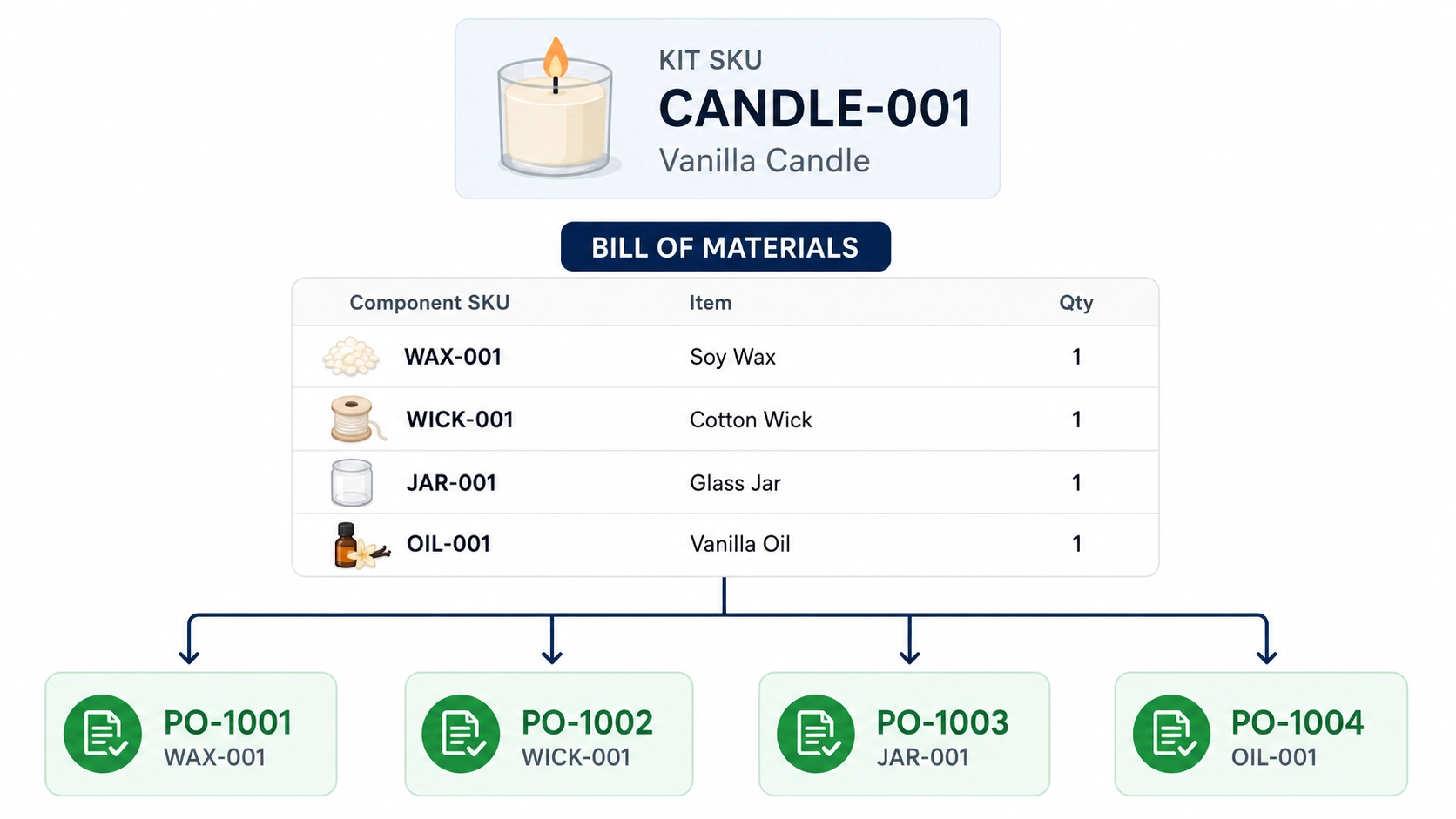
The connecting piece is the bill of materials, or BOM. A BOM defines what components are needed to build or assemble a SKU. It tells the system that one "starter kit" is really three separate items packed together. A production or work order drives the material requirements, and those requirements generate the supplier purchase orders for the components you're short on.
The example makes it concrete. Say your starter kit bundle needs three components: a bottle, a pump, and a printed box. If you plan to build and sell 50 kits, you need 50 of each component. Sell more kits than you have components for and you can't fulfill, no matter how many finished kits the store thinks you have. A system that understands the BOM works this out and tells you exactly what to buy.
Organizely handles BOMs, assemblies, and production orders in the same platform as your purchase orders, so component buying is part of the same loop as finished-goods reordering. If you build or kit products, the manufacturing inventory management side is where that connection lives.
Receiving Against a Purchase Order: Closing the Loop in the Warehouse
Purchase order receiving is the stage that closes the loop, and it decides your inventory accuracy. Creating a PO is the easy half. Confirming what actually arrived is where accuracy is won or lost.
The receiving workflow runs like this:
The PO arrives in the system with its expected line items.
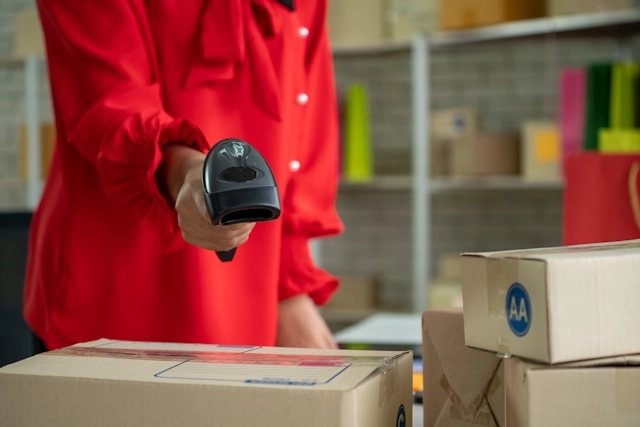
Warehouse staff scan barcodes or QR codes against those expected quantities.
Each line is confirmed as matching or flagged as a discrepancy.
Confirmed goods are put away to a specific bin, zone, or shelf location.
On-hand counts update in real time across every connected channel.
Partial receipts and over-receipts are the normal messiness of buying. Receive 180 of 200 units and the PO stays open for the remaining 20, so the shortfall is tracked instead of forgotten. Receive 210 when you ordered 200 and the system flags the over-receipt for you to reconcile against the invoice. This is also the moment to capture batch or lot numbers and serial numbers, which you'll want later for traceability and recalls.
The payoff is immediate. The second receiving confirms a shipment, on-hand counts climb and available-to-promise refreshes on Shopify, Amazon, and Etsy at the same time. The stock you promised against an inbound PO is now real stock, and no channel is working off a stale number. Organizely's barcode scanning and bin, zone, and shelf locations run this receiving step, tying it back to the alert that started the loop.
The Post-Purchase PO Process and Approval
Sending a PO is not the last step. After purchase, the order runs through a settle-and-close sequence, and much of it hinges on approval controls.
Approval comes in two places. Before a PO goes out, larger orders often need a sign-off: a value threshold above which a second person reviews the PO before it reaches the supplier. That check keeps a mistyped quantity or an unvetted supplier from becoming a commitment. A good system routes the draft to the right approver by value or category, so the control doesn't stall smaller routine buys.
After the goods arrive, the post-purchase process picks up:
Receipt. The warehouse receives against the PO and confirms line quantities.
Three-way match. Ordered, received, and invoiced quantities are compared.
Invoice approval. A clean match clears the invoice for payment; a discrepancy holds it for review.
Payment and close. Once paid and fully received, the PO is closed and its record archived under its number.
The status trail through this sequence is what gives you an audit history. When someone asks whether an order was approved, received in full, or paid, the PO record answers it. A free purchase order generator can produce the document, but it's the status tracking through receipt, match, and close that turns a PO into a managed process.
What a Good Purchase Order System Tracks (Beyond the PO Number)
A PO number is just a label. The data underneath it is what lets you actually manage purchasing. When you evaluate purchase order management software, look at what it tracks:
Supplier and vendor details, including lead times per supplier.
SKU and variant-level line items, so a PO reflects exactly which variants you ordered.
Ordered vs. received vs. invoiced quantities, the three numbers behind the three-way match.
PO status: draft, sent, acknowledged, partially received, closed.
Landed cost per unit, so your product costing reflects freight and duties, not just the sticker price.
Reorder history by supplier, so you can see who you actually rely on.
Lead-time variance reporting over time.
Lead-time reporting is the one people underrate. Your safety stock and reorder points are only as good as the lead-time numbers feeding them. If a supplier's actual delivery time has been drifting from 14 days toward 21, a system that tracks that variance lets you resize the buffer before the drift causes a stockout. Static reorder logic that assumes a fixed lead time will keep firing POs too late. Organizely reports on lead times, order volume, and forecast accuracy so those adjustments are based on your own history, not a guess.

Common Purchase Order Mistakes Small E-Commerce Teams Make
Most PO problems are the same handful of mistakes, repeated.
Ordering reactively after a stockout. You reorder once the shelf is empty instead of when the reorder-point alert fires. By then you've already lost sales and rushed the supplier.
Running POs through email threads. No status tracking, no audit trail, and no single place to see what's outstanding. When someone asks whether the box supplier was ordered, nobody actually knows.
Ignoring supplier lead-time variability. Setting safety stock as if every shipment arrives on the same day it always has. The one time the supplier slips, you're short.
Not capturing landed cost before goods arrive. You price the product off the unit price alone, then freight and duties eat the margin you thought you had.
Skipping partial receipts. You receive 180 of 200 units, ship them, and never chase the missing 20. The PO stays half-open in your head and nowhere else.
Not connecting inbound PO quantities to ATP. Your channels only see on-hand stock, so you either stop selling too early or oversell against inventory that hasn't landed.
An integrated system removes each of these by design, because the alert, the PO, the receiving count, and the channel sync are the same record rather than four disconnected ones.

How to Create a Purchase Order in Organizely
Here is what the loop looks like from an operations manager's seat.
A reorder-point alert surfaces a SKU that's dropped to its threshold. You open the draft PO, already populated with the right supplier, the SKU, and a suggested quantity based on your demand history. You review it, adjust the quantity if you want to round up to a case pack, confirm the pricing, and set the expected delivery date. If the order clears your approval threshold, you send it to the supplier directly from the platform, no separate email client.
From there you track the PO through its stages: acknowledged, in transit, received. When the shipment lands, your warehouse team receives against the PO with barcode scanning, confirming each line and putting stock away to its bin location. On-hand counts and available-to-promise update automatically across Shopify, Amazon, and Etsy. The loop that started with a low-stock alert closes with accurate counts on every channel.
That's the whole point of treating a PO as an operational cycle instead of a form. If you want to see how the pieces fit together, the warehouse and logistics management guide covers the receiving side, and purchase order management software is where the loop lives in one system.
Frequently asked questions
What is the meaning of a purchase order?
A purchase order is a formal, numbered document a buyer sends a supplier to authorize a purchase. It specifies the items, quantities, agreed price, and delivery terms, and it's created before any goods change hands. Once the supplier accepts it, both parties have a binding record of what was ordered and on what terms.
What is a PO vs. an invoice?
A purchase order comes from the buyer and authorizes a purchase before goods ship; an invoice comes from the supplier and requests payment after goods ship. They describe the same order from opposite directions. A goods receipt note sits between them, recording what actually arrived, and the three-way match compares all three before payment.
How does a purchase order get paid?
A purchase order gets paid through a three-way match. You compare the quantity ordered on the PO, the quantity received in the warehouse, and the quantity billed on the supplier's invoice. When all three agree, you release payment. When they don't, the discrepancy surfaces before money leaves your account, which prevents overpaying for goods you never received.
What are the 4 types of purchase orders?
The four types of purchase orders are standard, blanket, contract, and planned. A standard PO is a one-off order at a fixed quantity and price. A blanket PO covers recurring orders over a period at agreed terms. A contract PO locks pricing while leaving quantities open. A planned PO is generated from a demand forecast or an MRP run and dated in advance.
How does a reorder point trigger a purchase order?
A reorder point triggers a purchase order when stock drops to a level that covers expected demand during the supplier's lead time plus a safety-stock buffer. At that point the system fires an alert and creates a draft PO so the order goes out before you dip into safety stock. Sending it earlier means the replacement shipment lands before you run out.