
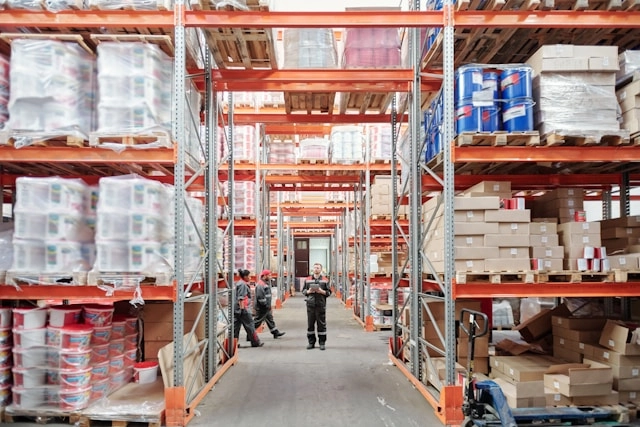
A fulfillment center is a facility built to receive, store, pick, pack, and ship customer orders, not just hold stock until someone needs it. That last part is the whole difference. A traditional warehouse stores goods. A fulfillment center moves them out the door as fast as orders come in. If you sell on Shopify, Amazon, and Etsy, the building matters less than whether your inventory numbers stay accurate across all three at once. This guide covers what a fulfillment center is, how it works step by step, and the inventory and warehouse workflows that decide whether yours actually performs.
What Is a Fulfillment Center?
A fulfillment center is a facility dedicated to processing customer orders end to end: receiving inbound stock, storing it, picking and packing individual orders, shipping them, and handling returns. It's throughput-first. A distribution center, by contrast, moves bulk shipments between businesses (a manufacturer to a retailer), and a traditional warehouse is storage-first, holding inventory with no built-in order-processing flow.
Think of it as the operational heart of e-commerce. When a shopper clicks buy, the fulfillment center is where that click turns into a boxed order on a truck. Everything the customer never sees (the shelf the item sat on, the scan that confirmed it, the label that routed it) happens inside those walls. The rise of two-day and next-day expectations is what pushed fulfillment centers from a nice-to-have into the default way most online orders move. two-day delivery has become a baseline customer expectation in e-commerce

The four core activities inside any order fulfillment center are inbound receiving and putaway, inventory storage, pick/pack/ship, and returns processing. Everything else is a variation on those.
There are three ways to get those activities done. You can run an in-house operation yourself, hand it to an independent third-party logistics provider that fulfills across all your channels, or use a marketplace program like Fulfillment by Amazon, where you send stock into the marketplace's own network and it picks, packs, and ships for you. Each is a different flavor of the same job.
A fulfillment center package is simply a customer order that's been picked from the shelf, packed, labeled, and handed to a carrier from that facility. When you get a "shipped from fulfillment center" notice, that's the building it left.
Fulfillment Center vs. Warehouse: The Real Difference
The defining line is storage versus throughput. A warehouse optimizes for holding as much as possible per square foot. A fulfillment center optimizes for getting single orders out accurately and fast. That one distinction changes the staffing, the equipment, and the software you need.
A storage-first warehouse leans on forklifts, tall racking, and pallet moves. A fulfillment center leans on pickers walking or riding pick paths, pack stations with scales and label printers, and barcode scanners at every touch. You're handling eaches, not pallets.
For most small e-commerce brands, this comparison is academic, because they run one leased unit that does both jobs. Bulk stock sits in the back, and the front is a pick-and-pack line. That hybrid is where accuracy problems start. When the same space is warehouse and fulfillment center, you need bin, zone, and shelf discipline plus barcode and QR scanning at every step to keep the system matching the shelf. We cover the physical setup in more depth in E-commerce Warehouse Essentials for Shopify, and the same principles carry over the moment your warehouse starts shipping orders.
The line blurs fastest for brands scaling past a few hundred orders a week. You still call it a warehouse, but it behaves like a fulfillment center, and the software has to keep up.

Why Sellers Use a Fulfillment Center: The Benefits
The pull toward a fulfillment center, whether you build one or buy into someone else's, comes down to a handful of concrete advantages.
Faster delivery. A layout built for throughput and, in a 3PL's case, multiple regional locations shortens the distance between stock and customer. That's how brands hit two-day windows without owning a national footprint.
Lower per-order cost at volume. Slotting by velocity, batch picking, and shared carrier rates drive down the cost of moving each order once volume is steady.
Scalability during peaks. A center built for order processing absorbs a Q4 surge that would bury a storage-first warehouse.
Fewer stockouts and oversells. When the fulfillment flow is tied to one accurate inventory number, you stop selling stock you don't have.
Time back for the business. Handing off (or systematizing) receiving, picking, and returns frees you to work on product and demand instead of packing boxes.
The catch is that every one of these benefits assumes your inventory data is right. A fast building shipping the wrong numbers just makes mistakes faster.
The Challenges and Drawbacks of a Fulfillment Center
The upside is real, but so is the downside, and sellers who only hear the pitch get blindsided. Start with the loss of visibility. The moment your stock sits in someone else's building, you're one integration away from flying blind. If the sync breaks, you're selling against a number you can't see, and the first sign of trouble is an angry customer, not a dashboard.
Then there's the cost of getting it wrong. A single misslotted SKU or a stale count ripples into oversells, cancellations, and refunds. Returns pile up in a corner you don't walk past every day. And the more channels you add, the more places the numbers can drift out of step.
Outsourcing carries its own drawbacks. You trade control for reach: your unboxing, your inserts, your handling standards all pass through someone else's process. Contracts often lock in minimums, and peak-season surcharges land exactly when your margins are thinnest. None of this is a reason to avoid a fulfillment center. It's a reason to keep your own system of record tight so the building's problems never become your data's problems.

Cost Considerations and Pricing
Fulfillment costs stack in layers, and the trap is looking at only one of them. In-house, your costs are mostly fixed: rent, racking, scanners, and labor you pay whether you ship ten orders or ten thousand. That's predictable but unforgiving during slow months.
Outsourced fulfillment flips most of that to variable. A typical 3PL bills across a familiar set of line items:
Receiving, usually per unit or per pallet inbound.
Storage, charged by the pallet, bin, or cubic foot per month, so slow movers quietly bleed you.
Pick and pack, the per-order and per-item fee that scales directly with volume.
Shipping, the carrier cost, often with the 3PL's negotiated rates baked in.
Returns and extras, kitting, special packaging, and account minimums that hide in the fine print.
Marketplace programs like FBA fold most of this into fulfillment and storage fees, with long-term storage surcharges that punish stock that doesn't move. The number that actually matters is cost per order, all-in, measured against the margin on the products you ship most. A cheap pick fee attached to expensive storage on a slow SKU is not a deal. Model your real mix before you sign, because the sticker rate and the true rate are rarely the same.
How a Fulfillment Center Works: Step-by-Step
Here's the operational flow an ops manager will recognize in their own building.
Step 1: Inbound receiving and putaway
Stock arrives at the dock. Someone inspects it against the purchase order, checks quantities and condition, then puts it away in an assigned location. The metric that matters here is dock-to-stock time: how fast received goods become sellable. Product sitting on a receiving dock for two days is product you can't sell for two days.
Step 2: Inventory storage and slotting
Stock gets slotted by velocity. Fast movers (your A items) go near the pack stations and at waist height. Slow movers (C items) go to the far corners. Each SKU gets a bin, zone, and shelf assignment so a picker can find it in seconds. This is where ABC analysis earns its keep, and where a clean location scheme prevents the daily hunt for lost stock.
Step 3: Order triggering across channels
An order lands. If you sell on Shopify, Amazon, and Etsy, this is the moment things break without real-time stock sync. Sell the last unit on Amazon while it's still showing available on Shopify, and you've got an oversell, a cancellation, and a customer you won't get back. Organizely keeps real-time inventory sync across Shopify, Amazon, and Etsy so one shelf feeds every channel from a single number, not three drifting ones.
Step 4: Pick, pack, and ship
The order routes to a picker. Small operations use single-order picking; busier ones batch multiple orders into one trip or pick by zone. The picker scans each item to confirm it against the order, so a wrong SKU gets caught before it ships. At the pack station, items are boxed, weighed, and labeled, and the final carrier scan closes the loop. A barcode-driven pick/pack/ship workflow with task assignments keeps pick accuracy near the industry target of 99.5%, the level that keeps refund rates low. warehouse pick accuracy of 99.5% is a common industry benchmark
Step 5: Returns and reverse logistics
Returns come back, get graded, and either restock as sellable, get repaired, or get disposed of. The number to watch is return processing time in minutes, not days. Good stock sitting in a returns pile is inventory you've already paid for and can't sell.

Service Quality and Reliability
Speed is only half the story. A fulfillment center that ships fast but ships wrong is a liability with good marketing. Reliability is what you're actually buying, and it shows up in a few measurable places.
Order accuracy comes first. Did the customer get the right item, in the right quantity, undamaged? Every wrong pick is a return, a reship, and a review you didn't want. On-time shipping is next: not the average, but the tail. A 3PL that hits its SLA ninety-eight percent of the time still misses on a busy Tuesday, and those are the orders customers remember.
Then there's how the operation behaves under load. Anyone can look reliable in July. The test is Q4, when volume triples and the weak links snap. Ask a prospective 3PL for peak-season accuracy and on-time numbers, not annual averages that smooth the failures out. The steadiest signal of a reliable operation is consistency across metrics, week to week, that only holds when the system number matches the shelf every single day. Reliability isn't a promise on a sales call. It's a pattern in the reports.
Who Works in a Fulfillment Center: Roles and Responsibilities
Throughput is a team sport, and the org chart maps cleanly onto the five steps above.
Receiving associates check inbound stock against the PO, flag damage and shortages, and put product away in its assigned location. They own dock-to-stock time.
Pickers work the assigned queue, scan each item, and move orders to packing. Their output shows up as lines picked per labor hour.
Packers box, weigh, and label orders at the pack station, and make the final accuracy check before the carrier scan.
Inventory control (or cycle-count) staff run counts, investigate discrepancies, and keep the system number matching the shelf.
Returns processors grade returned stock and decide restock, repair, or dispose.
Shift leads and the fulfillment or ops manager assign tasks, watch the metrics, and staff for tomorrow's volume.
In a small brand, one or two people wear all of these hats. What doesn't change with headcount is the need to know who owns each task on each shift, which is exactly what task assignments in your inventory system make explicit.
Fulfillment Center Technology and Integration
The physical work is only as good as the software behind it, and the seams between systems are where accuracy leaks.
The floor tools are familiar: barcode and QR scanners at receiving, pick, and pack; label printers and scales at pack stations; and, in larger operations, conveyors or pick-to-light aids. Behind them sits the software layer, a warehouse management system for the movement of stock and an inventory management system for the numbers.
Integration is the part that decides whether it all works. Your fulfillment operation has to talk to your sales channels (Shopify, Amazon, Etsy), your carriers for rates and labels, and your purchasing so reorder points fire against real stock. When those connections are live, a scan at the pack station updates the same number your storefront reads from. When they're stitched together by hand or by spreadsheet, every handoff is a place the numbers drift. A single platform such as Organizely's warehouse management system closes those seams by carrying inventory, warehouse, and purchasing in one place.

Omnichannel Fulfillment Capabilities
Most brands don't sell in one place anymore, and the fulfillment center has to keep pace. Omnichannel fulfillment means one pool of stock serving every channel at once: your Shopify storefront, your Amazon and Etsy listings, wholesale orders, and any retail or pop-up you run. The unit on the shelf shouldn't care which channel claimed it.
That only works if the number is shared, not copied. The failure mode is obvious and common: the same physical unit shows as available on three storefronts because each channel keeps its own count. First sale wins, the other two oversell, and you're issuing apologies. Real omnichannel fulfillment routes every order against a single, live stock number, so selling a unit on Amazon immediately drops it from Shopify and Etsy.
The harder version is fulfilling from multiple locations. Stock in your own unit, stock in a 3PL's building, and stock in a marketplace's network should all report into one view, and orders should route to whichever location ships fastest or cheapest. Ship-from-store, split shipments, and regional routing all live here. None of it is possible without a system of record that treats every location as part of one inventory, which is exactly the control layer that survives no matter where the physical work happens.
Inventory Management Inside a Fulfillment Center
This is where most fulfillment centers quietly fail, and where competitor articles go thin. The building can be immaculate and the numbers still wrong.
Real-time stock accuracy
The number in the system has to match the shelf. When it doesn't, you get phantom stock (the system says you have it, you don't) and oversells (you sell what's already gone). Every scan at receiving, pick, and pack exists to hold that match together. Our full walkthrough on ecommerce inventory management goes deeper on the habits that keep accuracy high.
Reorder points, safety stock, and replenishment
Automatic reorder points tell you when to buy before you run out. They only work when they're tied to real supplier lead times, which is why reorder logic belongs next to your purchase orders and supplier management. Set safety stock as a buffer against late shipments and demand spikes, and the system can flag a reorder the moment stock crosses the threshold. If you're still setting these by gut, the safety stock formula is worth a read.
AI demand forecasting
Reorder points react. Forecasting looks ahead. AI demand forecasting reads your sales history to predict what you'll need before a peak period, so you place the purchase order while there's still lead time to fill it. Miss the reorder window before a Q4 surge and no amount of warehouse efficiency saves you.
Batch/lot and serial-number tracking
Brands in food, cosmetics, supplements, or electronics need batch/lot tracking for recalls and expiry, and serial-number tracking for high-value units. When a lot needs pulling, you want to find every affected unit in seconds, not dig through a spreadsheet.
Cycle counts vs. full stock counts
A full stock count shuts the operation down while you count everything. Cycle counts spread the work out: count a slice of SKUs each day (usually your fast movers most often) and never stop shipping. It's the operational preference for any fulfillment center that can't afford to close the doors for a day.

Regulatory Compliance in Fulfillment Operations
Compliance is easy to ignore until an audit or a recall forces the issue, and it leans directly on the tracking you already run.
Traceability for recalls. Regulated categories (food, supplements, cosmetics, some electronics) require you to trace an affected batch or lot to the units you shipped. Batch/lot and serial tracking is what makes that a query, not a panic.
Expiry and rotation. Perishable and dated goods need first-expiry-first-out handling and accurate expiry data on the item master so you don't ship product past date.
Labeling and documentation. Carriers and cross-border shipments carry their own labeling, customs, and dangerous-goods rules; the paperwork has to match what's physically in the box.
Workplace and data rules. A fulfillment center is also a workplace, with safety obligations, and it holds customer data, which brings its own handling requirements.
The through-line is records. If your system can show what was received, where it sat, and where each unit shipped, most compliance questions become a report you can pull rather than a fire drill. Check the specific requirements for your product category and region before you scale.
Fulfillment Center Metrics That Actually Matter
Track these weekly, not quarterly. By the time a quarterly report flags a problem, you've shipped three months of it.
Pick accuracy (%): the baseline for refund rates. Aim to hold it close to the 99.5% industry target or higher. Every wrong pick is a return, a reship, and an unhappy customer.
Lines picked per labor hour: your productivity and scheduling anchor. It tells you how many pickers you need for tomorrow's volume.
Dock-to-stock time: how fast inbound stock becomes sellable. Long dock-to-stock time is revenue sitting idle.
Order cycle time: order placed to carrier scan. This is what the customer feels.
Inventory accuracy (%): what the system says versus what's physically on the shelf. Everything else rests on this one.
Return processing time: minutes to relist good stock, not days.
Organizely's reporting covers SKU counts, order volume, lead times, forecast accuracy, stock turnover, and pick/pack throughput, so these numbers come from the same system that runs the operation instead of a spreadsheet someone updates on Fridays.

Setting Up or Optimizing Your Operations
If you're standing up an in-house or hybrid fulfillment center, work through these in order.
Define your goals. Order volume, SLA targets, SKU count, and growth over the next year. The plan follows the numbers.
Design the map. Lay out zones, pick paths, and slotting by velocity so A items sit closest to packing and pick paths don't double back.
Pick your software layer. More on this below.
Label everything. Racks, bins, doors, pallets, and workstations all get scannable labels. A location with no label is a location that gets miscounted.
Set your item masters. Every SKU needs clean data: dimensions, weight, barcode, default location, reorder point.
Choose your picking modes. Single-order, batch, or zone picking, matched to your volume.
Choosing the right software layer
You can stitch together a standalone WMS, a separate inventory management system, and a spreadsheet to hold reorder logic. Every seam between those tools is a place where the numbers drift. The alternative is one platform that carries inventory, warehouse management, purchasing, and manufacturing together, so the pick you scan on the floor updates the same stock number your Shopify listing reads from. That's the case Organizely is built for.
Staff and task management
Assign picks, packs, and receiving by shift so nobody's guessing what to work on. Warehouse task management with staff assignments and barcode scanning turns "figure it out" into a queue people work through, which is what keeps lines-per-labor-hour steady when volume climbs.
When to Outsource (and What You Still Control)
Three signals say it's time to consider outsourced fulfillment: your volume is predictable enough to price a 3PL contract, your SLAs are strict enough that a miss costs you real money, or you've got a geographic gap where you can't hit two-day delivery economically.
For context, in-house means you run the space, staff, and process, with higher fixed costs and full control, which suits branded unboxing, high-SKU complexity, or brands that manufacture. A 3PL turns cost variable and buys you a footprint and carrier rates. A marketplace program like FBA gets Prime reach at the cost of visibility, since your stock is spread across the marketplace's network under their rules and fees. Many brands run a hybrid: in-house for hero SKUs, a 3PL for overflow or regional coverage.
Here's the part sellers get wrong. You can outsource the building. You can't outsource the inventory data. Stockouts and oversells don't care whose warehouse the product sits in. If your 3PL ships an order but your Shopify listing doesn't update, you'll oversell the next customer just the same.
So even with fulfillment handed off, your system of record stays yours. Multi-channel real-time sync and multi-warehouse support are the control layer that survives outsourcing: stock in the 3PL's building, stock in your own unit, and stock in a marketplace's network all report back to one number that feeds every storefront. Keep that, and you can move the physical work anywhere without losing the plot on what you actually have to sell.

Frequently asked questions
What is a fulfillment center?
A fulfillment center is a facility dedicated to receiving, storing, picking, packing, and shipping individual customer orders, plus processing returns. It's built for order throughput rather than long-term storage.
Is a 3PL the same as a fulfillment center?
Not exactly. A 3PL (third-party logistics provider) is a company you outsource fulfillment to, and it operates one or more fulfillment centers on your behalf. The fulfillment center is the physical facility; the 3PL is the service running it.
What is a fulfillment center package?
A fulfillment center package is a customer order that's been picked, packed, labeled, and shipped from a fulfillment center. When tracking shows an item shipped from a fulfillment center, that's the facility where your order was processed.
How do I keep inventory accurate across a fulfillment center and multiple sales channels?
Use one inventory system as your single source of truth with real-time stock sync across Shopify, Amazon, and Etsy, so every sale updates the same number. Pair that with barcode scanning at receiving, pick, and pack, and regular cycle counts to keep the system matching the shelf.